twitter logo facebook logo
Business Consultancy Services
UDYAM PRIVATE CONSULTANCY
Now udyamindia.in is udyamindian.com we change our brand and domain with new identity for better service. udyamindian.com is a PRIVATE consultancy firm and is NOT a Government Portal. Udyam / MSME Registration is FREE. We charge a nominal professional fee only for expert documentation, form-filing & support. +91-9031675081 | care@udyamindian.com

Udyam Re-Registration Process: Step-by-Step Guide for 2026
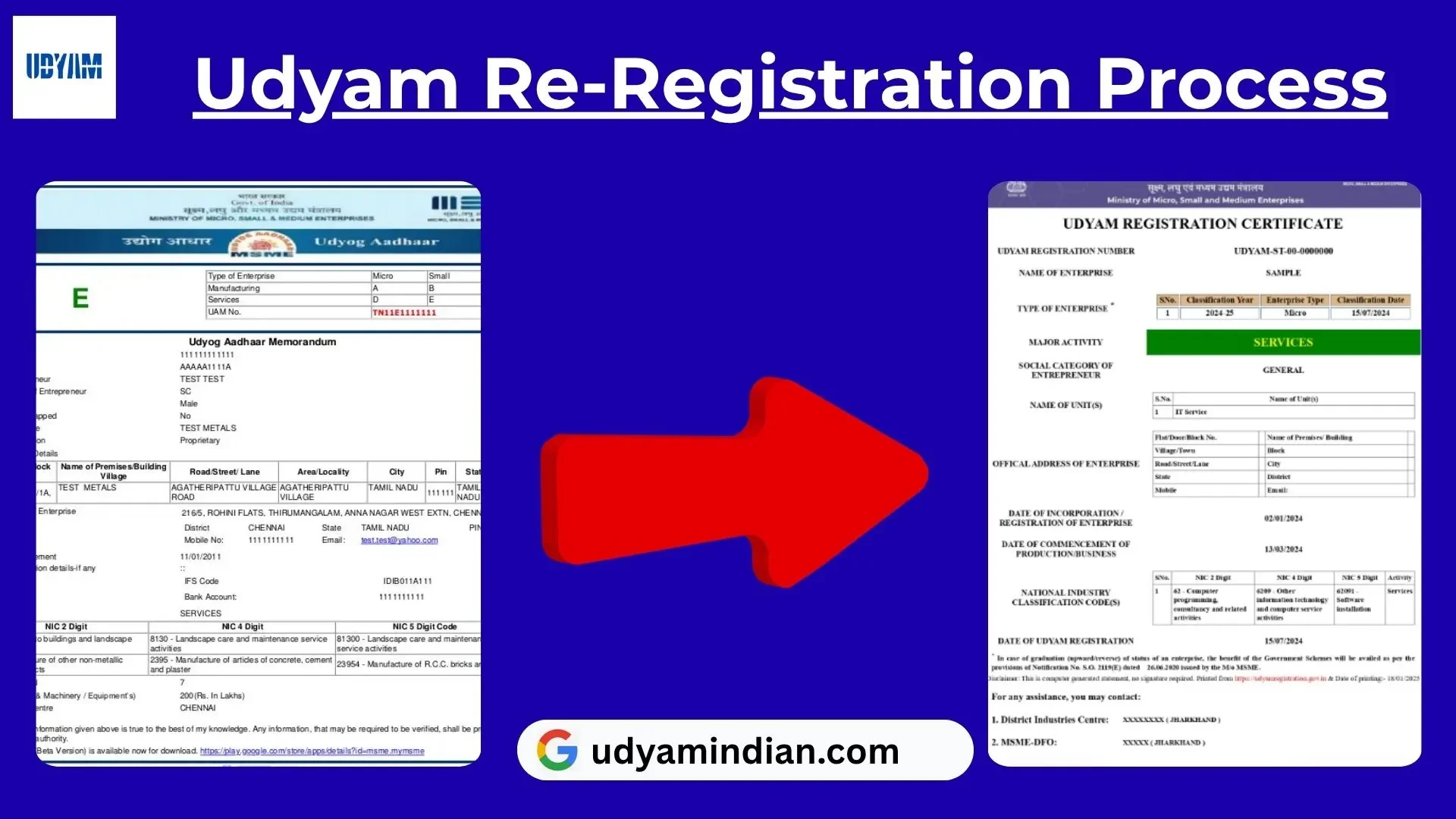
new-udyam-certificate-editing

If your business was previously registered under Udyog Aadhaar (UAM) or the old MSME registration system, you may need to migrate or renew your existing registration to the current Udyam Registration system. The Government of India launched Udyam on July 1, 2020. The process is completed online easily and hassle-free through the official Udyam Registration portal.

Step-by-Step Udyam Re-Registration Process
1
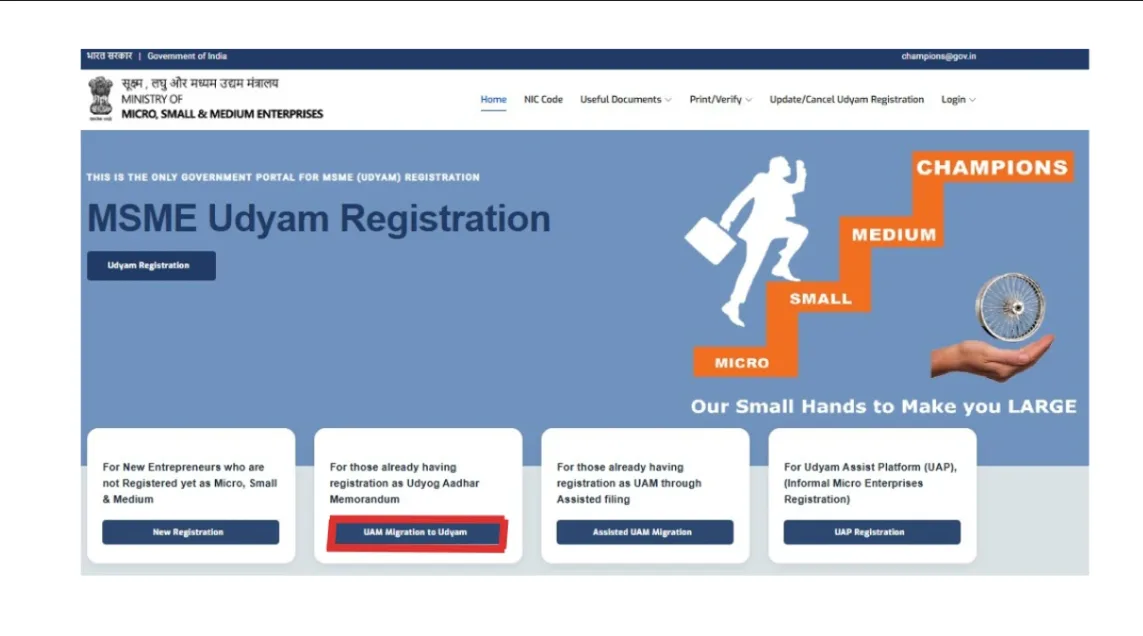
Visit the official Udyam Registration website: https://udyamregistration.gov.in/
2
Click the “UAM Migration to Udyam” option. This option will be seen on the home page. This button is only for existing users.
3

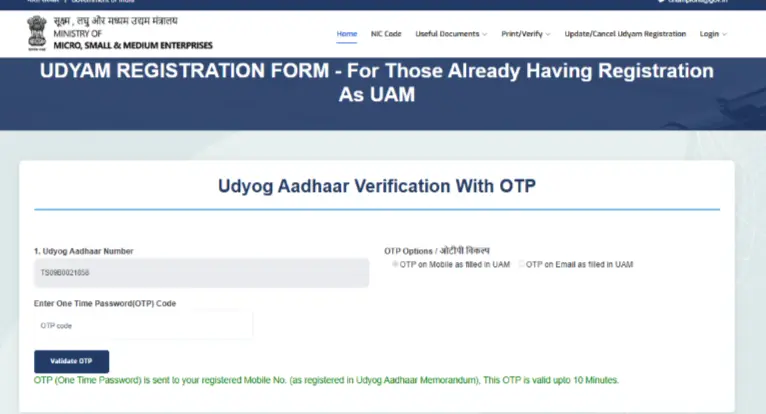
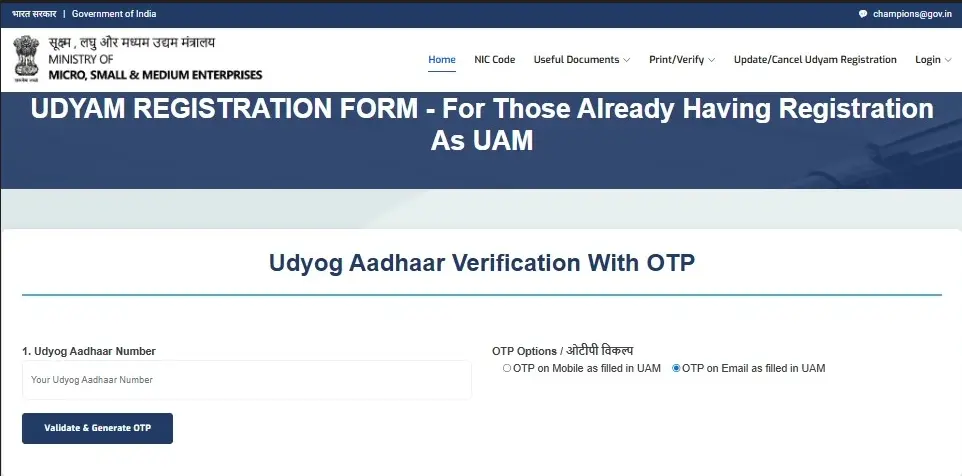
First, you need to verify your existing Udyog Aadhaar registration Verification

  • Enter your 12-digit UAM number
  • Choose the OTP option: Mobile number or Email ID (as per UAM)
  • Click the “Validate & Generate OTP” option.
4
An OTP will be sent to the mobile number or email ID selected in the previous step. Enter the OTP and click on the “Validate OTP” button. If the OTP is correct, your old Udyog Aadhaar details are verified, and you can proceed to the next migration process.
5

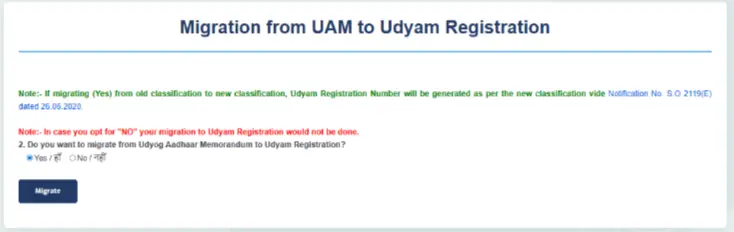
After successful OTP verification, the portal will ask whether you want to migrate your existing registration to the Udyam Registration system. Choose the “Yes” option and continue. Next, click on the “Migrate” button to start the Udyam registration process.
udyam gov new registration form screen
6

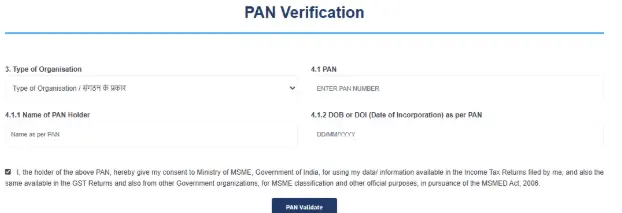
Then, the next step is PAN verification. Select “Type of Organisation” (e.g., proprietorship, partnership),­ PAN card number, PAN holder name, and date of incorporation as per PAN.

  • Enter the details correctly and click on the “PAN Validate” button.
7

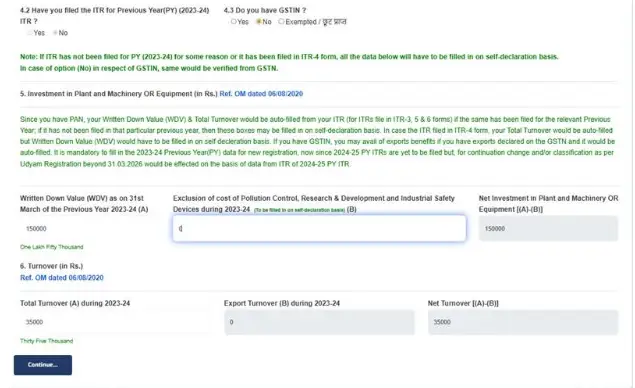
After PAN verification, you may need to provide your GST and Income Tax Return (ITR)-related information. Choose the “Yes” or “No” option according to your business. You may also need to provide your investment and annual turnover details and click on the button “Continue”.
8

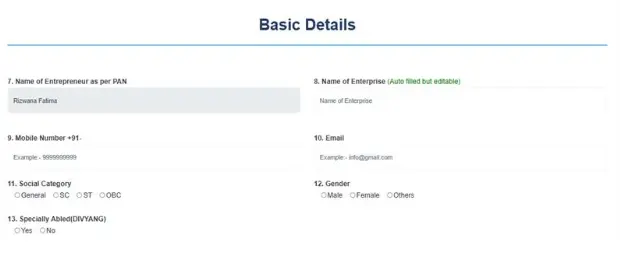
Enter Basic Enterprise Details

  • Entrepreneur's name
  • Mobile number
  • Email ID
  • Enterprise name
  • Other required business information

Enter every detail carefully and recheck all information.
9
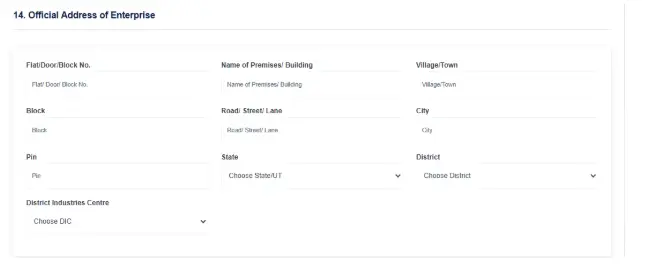
Next, provide the official address of your business. Enter the required address information, such as the state, district, PIN code, and other applicable details.
10
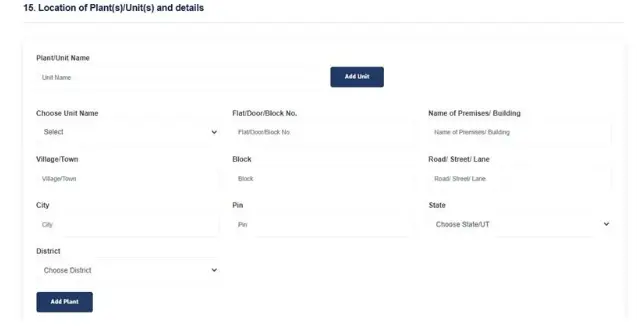
If your business and unit addresses are the same, then type the unit address the same as the business address. If your business has multiple locations, click on “Add Unit” to add additional details of your business; after filling in all the details carefully, click the “Add Plant” button.
11

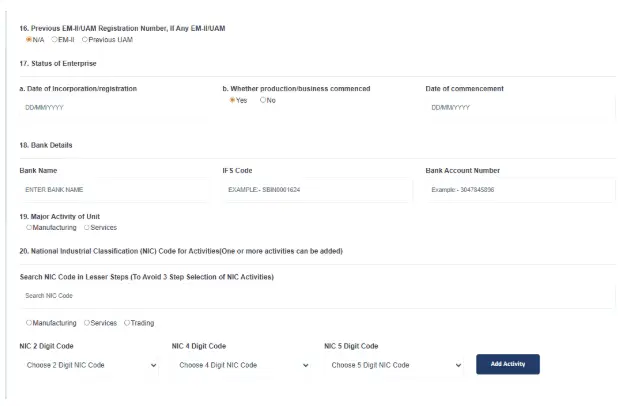
In the next section, provide some basic information:

  • Enterprise status
  • Bank account details
  • Type of business activity
  • Business classification
  • NIC code

Selecting the correct NIC code is important because it describes the main business activity of your enterprise. If your business has multiple activities, choose the primary activity code and click the “Add Activity” button to enter your additional NIC code.
12
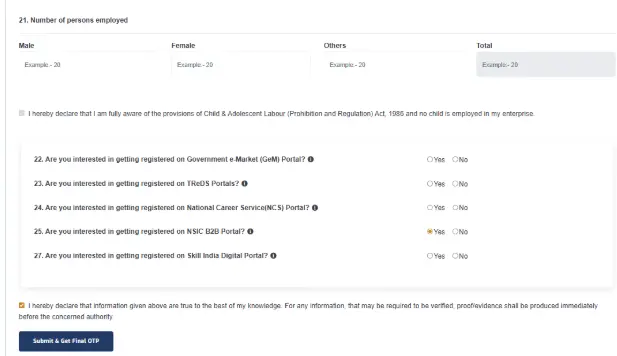
Next, provide details about the number of employees working in your enterprise. Read the declaration and choose the applicable business. Once everything is checked, click on the “Submit & Get Final OTP” button.
13
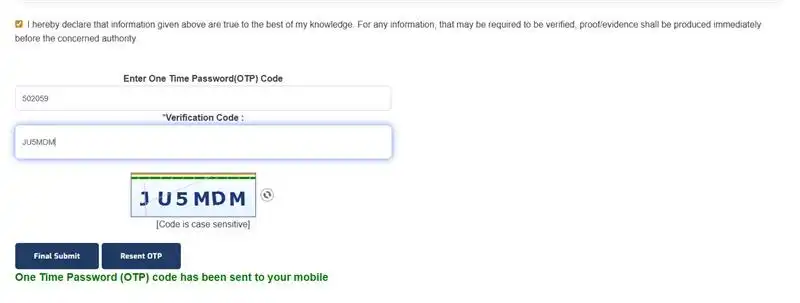
After submitting the form, an OTP will be sent to the registered mobile number. Enter the OTP and click on the “Final Submit” button to complete the migration registration process.
14
After the OTP verification is successful, you will receive a Udyam Registration Number (URN) that will be generated and displayed on the screen.

Note: After getting the Udyam Registration Number, download the Udyam Certificate from the same Udyam Registration portal. To download your Udyam Certificate online,
read this blog: Udyam Certificate download PDF

Conclusion

If your business was registered under the old Udyog Aadhaar (UAM) system, you can move your business to the current Udyam Registration online. Follow the re-registration steps above carefully and check all your business details before submitting the form. After successful registration, you will receive a new Udyam Registration Number (URN) and can download your Udyam Certificate.

Confused about how to renew your old Udyog Aadhaar registration to the new Udyam portal? Udyam Indian provides online consultancy services and support throughout the Udyam re-registration process . Our team can help you with form filling, checking details, submission, and certificate download. We make the process simple, quick, and without any confusion, so you can complete your UAM to Udyam migration process.

Frequently Asked Questions

You need to apply when:

  • You have registered on Udyog Aadhaar Registration
  • You registered on MSME before July 2020
  • You want to continue getting MSME benefits
If you do not re-register or migrate your old Udyog Aadhaar registration to the official Udyam Registration Portal, your business will lose MSME benefits such as government schemes, bank loans, subsidies, tenders, and more.
Yes, you can renew on the Udyam portal without a GST number. If your business has a GST number, you can submit it; if you do not have a GST number, you can easily apply for the Udyam Registration Certificate.
No, you can apply for Udyam registration only once for your business. If you have not registered your MSME on the Udyam Portal, then complete the New Udyam Registration Process. If you have an old Udyog Aadhaar Memorandum certificate, then you can migrate it to Udyam Registration by completing the Udyam Re-Registration Process. If there are some changes in your business structure or you want to update the NIC code, then you can update your Udyam Certificate by visiting the Udyam portal. Avoid multiple registrations, as multiple registrations can lead to cancellation or legal issues.
Udyam Re-Registration means migrating your old Udyog Aadhaar (UAM) registered business to the current Udyam Registration process. If you registered under the old Udyog Aadhaar system before July 2020, you need to switch to the new Udyam system to keep getting government benefits, loans, and subsidies.
   

Written by Sima

Business & MSME Content Writer

Sima is a business content writer specialising in Indian business compliance. She creates clear, practical content that helps business owners understand registration processes, government schemes, and related requirements. Her articles are based on reliable sources and are written with a focus on accuracy, clarity and real user needs.


Apply For Udyam Service - Registration, Update, Download, etc..