twitter logo facebook logo
Business Consultancy Services
UDYAM PRIVATE CONSULTANCY
Now udyamindia.in is udyamindian.com we change our brand and domain with new identity for better service. udyamindian.com is a PRIVATE consultancy firm and is NOT a Government Portal. Udyam / MSME Registration is FREE. We charge a nominal professional fee only for expert documentation, form-filing & support. +91-9031675081 | care@udyamindian.com

New Udyam Registration Process: Step-by-Step Guide 2026
new-udyam-certificate-editing

If you are starting a new business or are an existing small business, getting a Udyam Registration Certificate is mandatory. The New Udyam Registration is a government process for registering your business as an MSME (Micro, Small, Medium Enterprise). It is a completely online, easy, and hassle-free process.

Steps to Apply for New Udyam Registration Certificate:

1
First, go to the official Udyam Registration Portal: https://udyamregistration.gov.in/
2
Select the "New Registration" option for those who haven't registered with MSME. These options are for first-time users.
udyam gov Menu screen
3

Aadhaar verification is required. Enter your Aadhaar number and the name of your entrepreneur.

  • Click on the “Validate & generate OTP” button. You can receive an OTP on your Aadhaar-registered mobile number.
  • Enter the OTP so you can proceed to the next step.
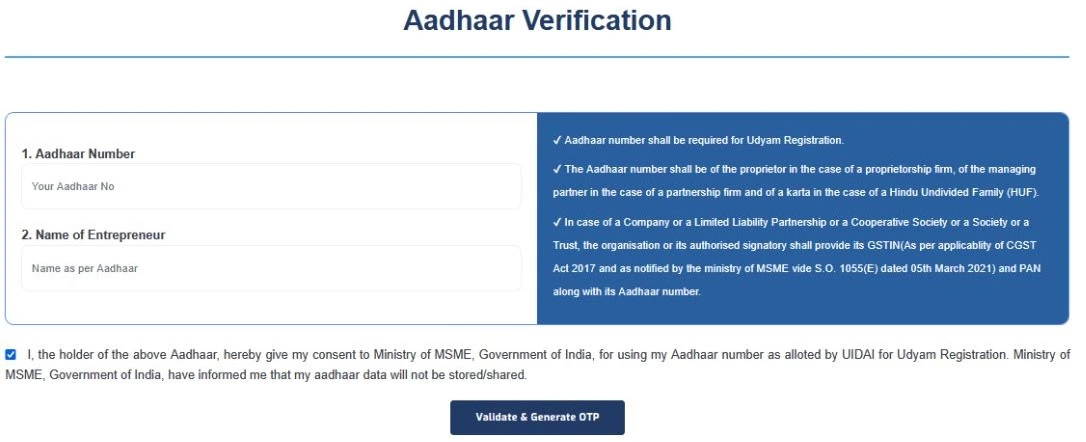
udyam gov aadhaar verification screen
4
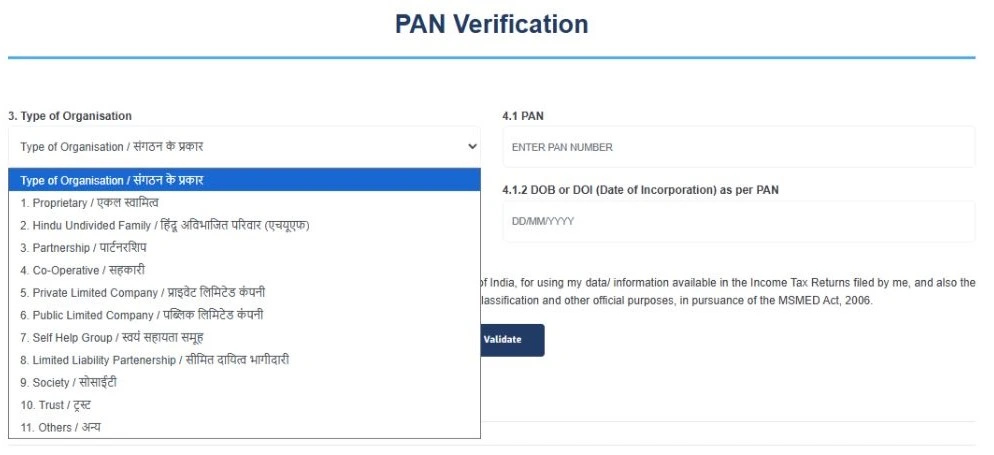
Once Aadhaar verification is successful, open a new page for PAN verification. Enter your PAN card details; the system will automatically fetch your data from the income tax database. Click the “Type of Organisation”; then the dropdown box will open. Choose your organisation type (e.g., proprietorship, partnership, Hindu undivided family).
udyam gov pan verification screen
  • Add more details like PAN number, PAN holder name, and date of incorporation for PAN verification.
  • Enter the details correctly and click on the “PAN Validate” button.

Note: You do not have to update or change your Aadhaar and PAN card details once you have completed the Udyam registration process, so cross-check all the details before submitting the form.
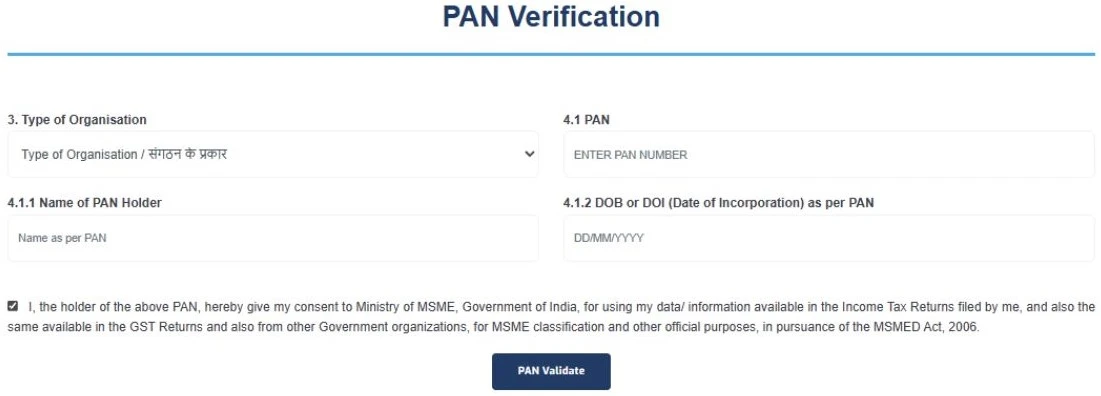
udyam gov pan verification screen
5

Submit your ITR and GST information. Whether you file GST or ITR, you can tick the "Yes" option instead of "No", fill in the investment and turnover details, and then click the "Continue" button.
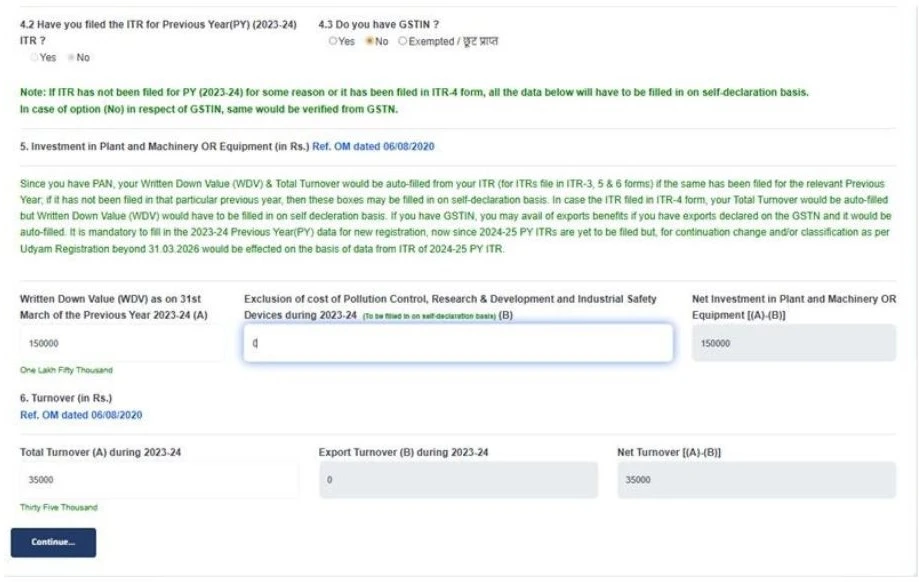
udyam gov new registration form screen
6
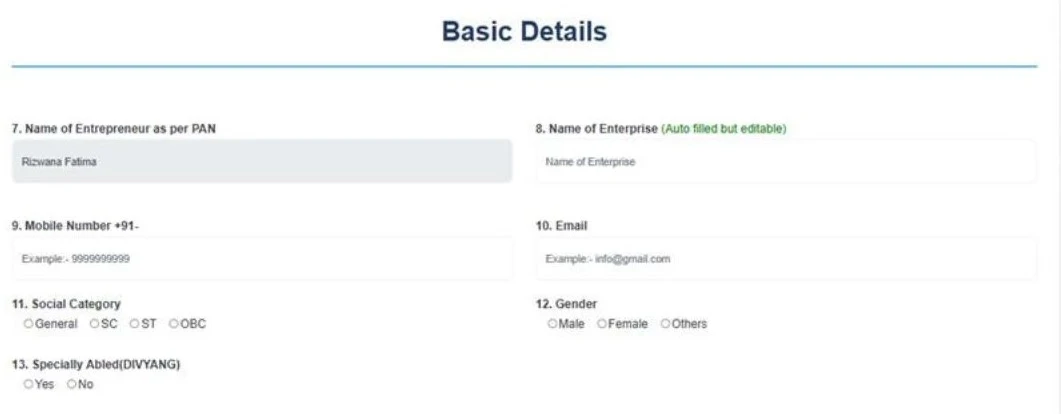
Then fill out a few more basic details, including
  • Business owner name
  • Enterprise name
  • Mobile number
  • Email ID
udyam gov new registration form screen
7
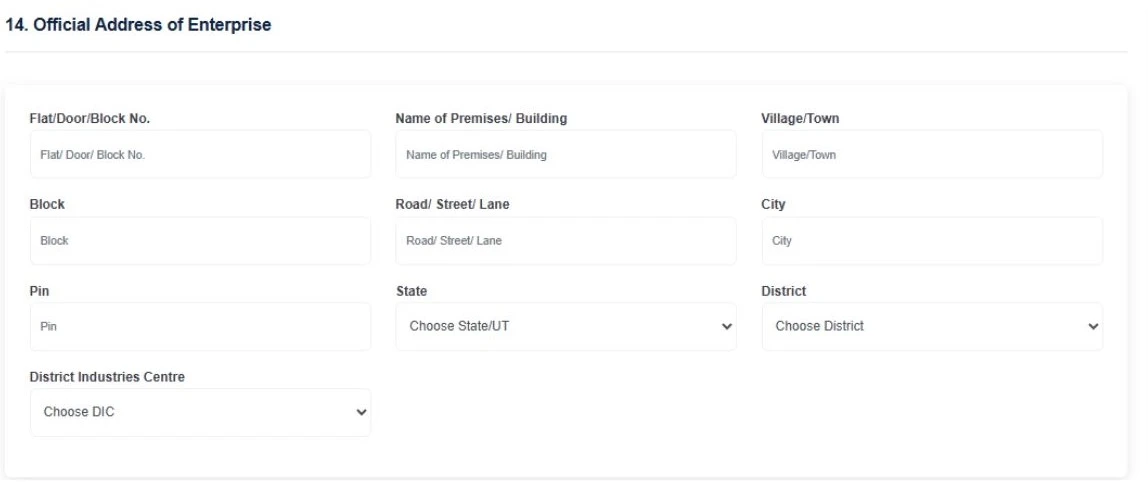
Enter your complete official business address, including the building or block number, street, city, state, district, and PIN code. Also note that you will not be able to change or update the state and district name after final submission.
udyam gov new registration form screen
8
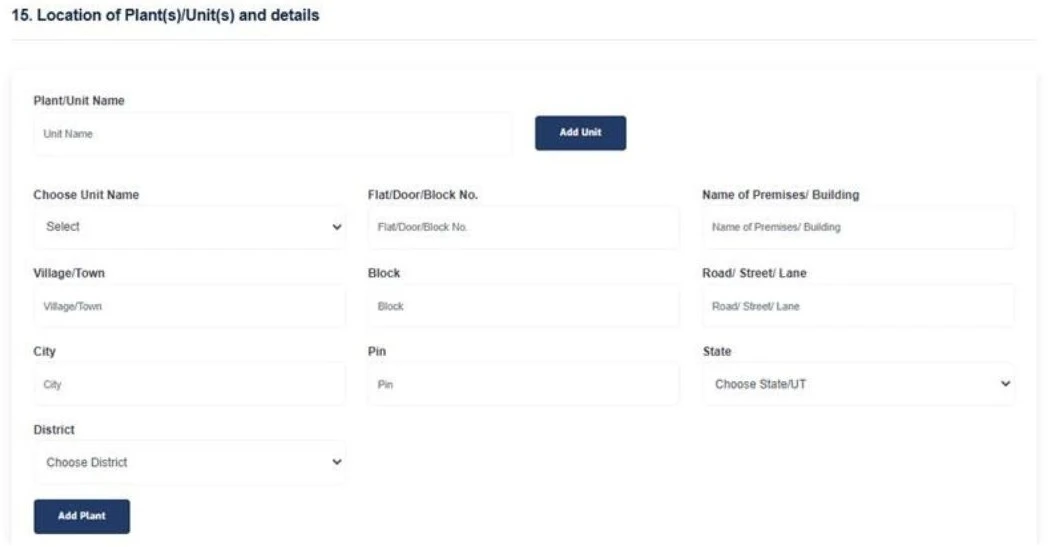
If the unit address is the same as the business address, then you can enter the unit address the same as the business address. In case your business has more than one branch, you can use the “Add Unit” option to add the details of your other branches, and after filling in all the details, click the “Add Plant” button.
udyam gov new registration form screen
9
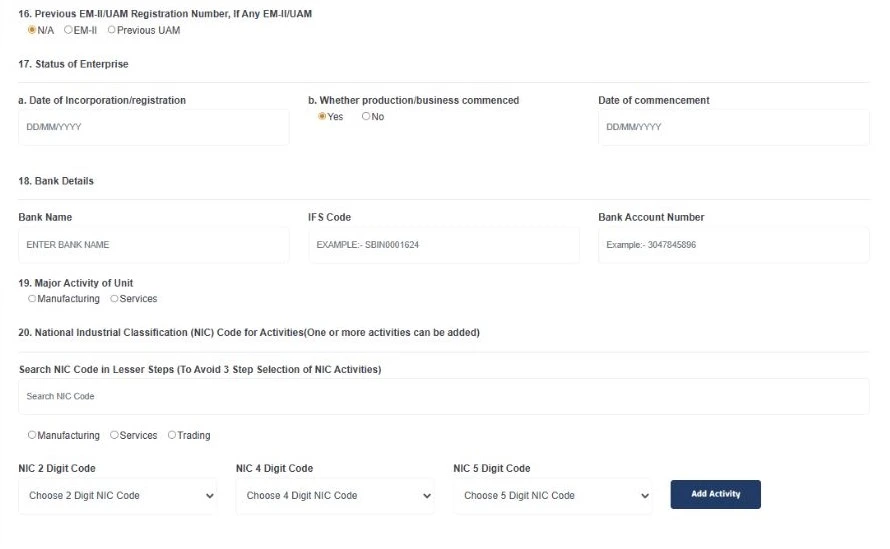
Provide your enterprise status (such as date of incorporation and date of commencement), bank account details, and select the accurate NIC code according to your business activity. You can select more than one code while working in manufacturing, trading, and service providers. The correct NIC code helps represent your type of business and activity.
udyam gov new registration form screen
10
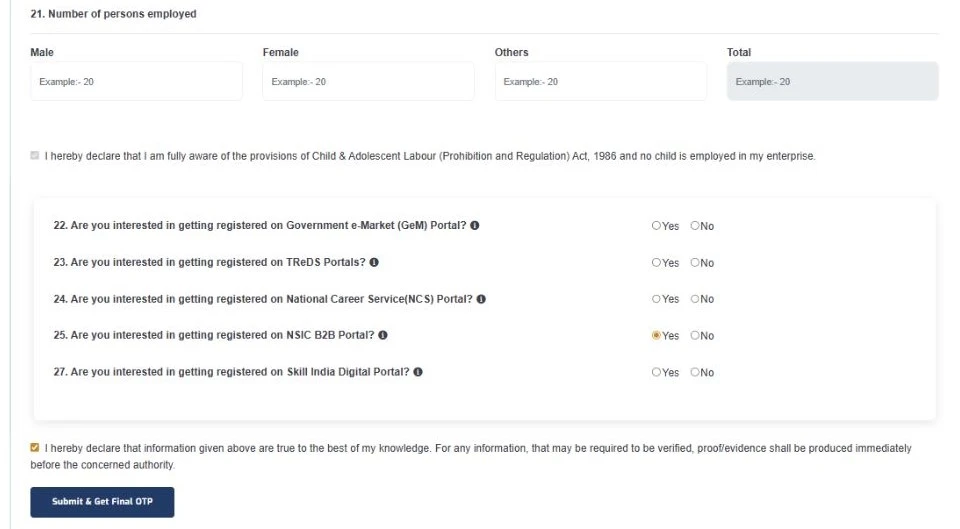
Enter the number of employees working in your company and put a tick in the Declaration box that applies to your business. And tap on the “submit & get final OTP” button.
udyam gov new registration form screen
11
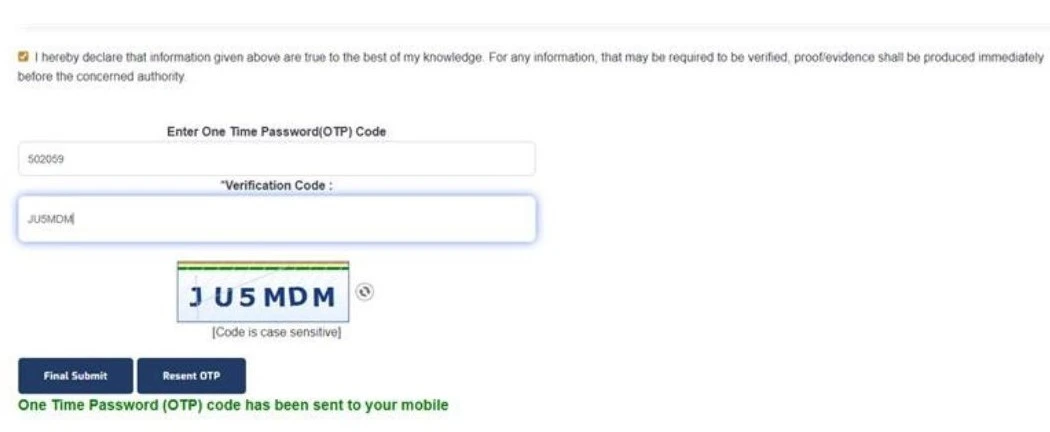
Finally, enter the OTP you can receive on your registrar mobile number, enter the verification code, and lastly click on the “Final Submit” button.
udyam gov new registration form screen
12
After successful submission:
  • You will get a Udyam Registration Number (URN) instantly.

Note: After getting the Udyam Registration Number, you can download the Udyam Registration Certificate from the same Udyam portal. Download the Udyam certificate quickly and easily to read this blog: Download & Print Udyam Registration Certificate.

Conclusion

Getting a new Udyam Registration Certificate is a simple online process if you follow each step carefully. Keep your Aadhaar, PAN, bank, and business details ready before starting. Check all information properly before final submission to avoid mistakes. Once registration is complete, you will receive your Udyam Registration Number (URN) and can download your certificate online through the same portal.

Confused about how to apply for New Udyam Registration? Udyam Indian offers online consultancy services through the New Udyam Registration Process. Our experts provide support with documents, form filling, submission, and certificate download. Our support team helps make Udyam Registration easier and stress-free.

Frequently Asked Questions

Any micro, small, or medium-sized business, like manufacturers, service providers, sole proprietors, partnership firms, LLPs, private limited companies, Hindu Undivided Families, or trusts, can apply for the New Udyam Registration Certificate.
To apply for a New Udyam Registration Certificate, you need an Aadhaar card, PAN card, bank account details, an Aadhaar-registered mobile number, email ID, business details, and address.
Yes, you can easily apply for a New Udyam Registration Certificate without GST, but if you have one, you can submit it.
No, Udyam Registration is not compulsory for every business. However, eligible MSMEs should register to access various government schemes, benefits, and support available for small businesses.
Udyam registration is free when completed through the official government portal. However, if you use a private consultancy website, you may have to pay a nominal service fee for assistance with the registration process.
   

Written by Sima

Business & MSME Content Writer

Sima is a business content writer specialising in Indian business compliance. She creates clear, practical content that helps business owners understand registration processes, government schemes, and related requirements. Her articles are based on reliable sources and are written with a focus on accuracy, clarity and real user needs.

Apply For Udyam Service - Registration, Update, Download, etc..