twitter logo facebook logo
-A A +A
A
A
Bussiness Consultancy Services
UDYAM PRIVATE CONSULTANCY

Now udyamindia.in is udyamindian.com we change our brand and domain with new identity for better service.

udyamindian.com is a PRIVATE consultancy firm and is NOT a Government Portal. Udyam / MSME Registration is FREE. We charge a nominal professional fee only for expert documentation, form-filing & support. +91-9031675081 | care@udyamindian.com


How to log into Udyam without a Registration Number online
How to log in to Udyam without a registration number online

The Udyam Registration Portal allows MSME owners to manage their business information online. You can use the portal to download your Udyam certificate, update business information, and check your registration details online.

Have a question about how I can log in to the Udyam portal without a Udyam registration number / UAM? Don’t worry, on this blog we will explain how you can log in without a Udyam number. So go on and follow the step-by-step process; I will guide you to recover your Udyam registration number easily.

Steps to Login Without URN

First, you need to retrieve your Udyam Registration Number; follow these steps
1
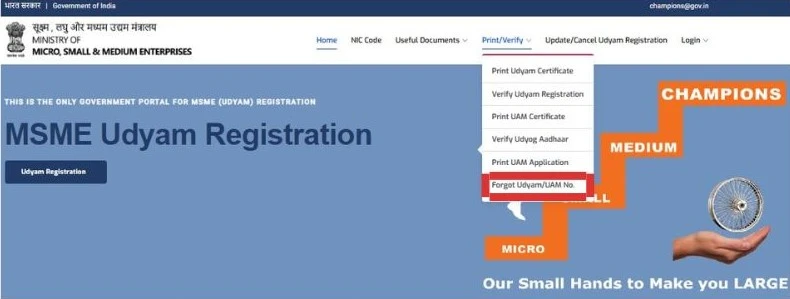
First of all, go to the Official Udyam registration portal, then click on the “print/verify” option and choose “forgot Udyam/UAM number” from the drop-down box.
udyam gov home screen
2

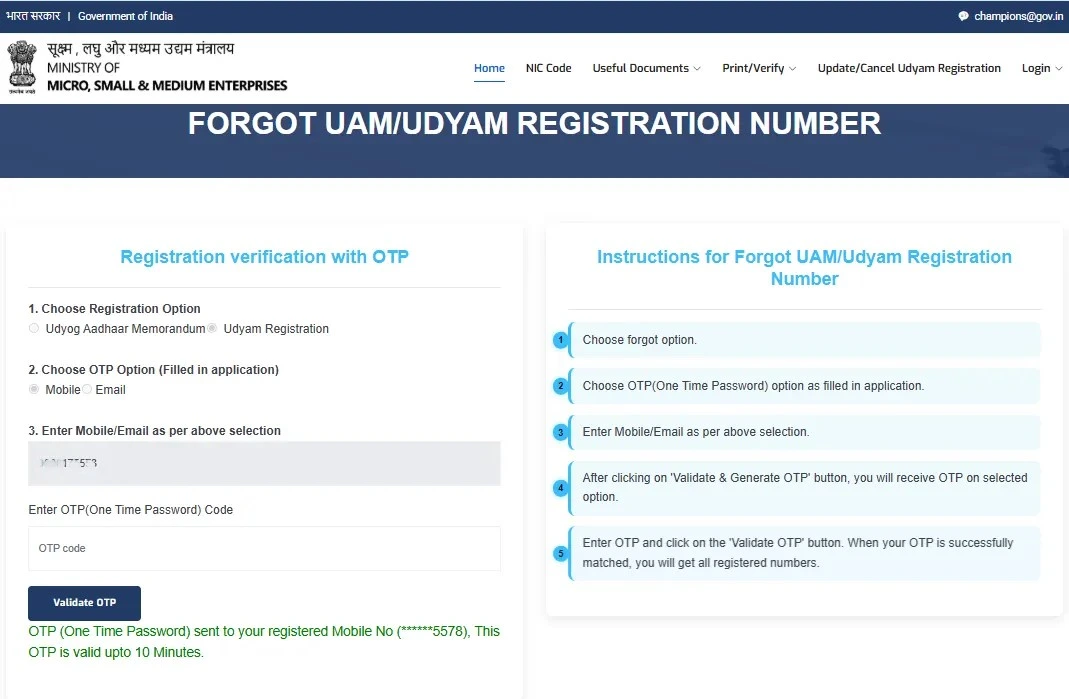
After that, the Forgot UAM/UDYAM registration number page opens, in which you have to choose the given option that appears on the screen.

  • Choose the registration option (Udyog Aadhaar Memorandum or Udyam Registration).
  • Which you want to use for OTP (registered mobile number or email ID).
  • Then fill in the mobile number or email ID you have selected from the selection box correctly in the given box.
  • There after, click on “Validate and Generate OTP”. OTP will be received in your selected option.
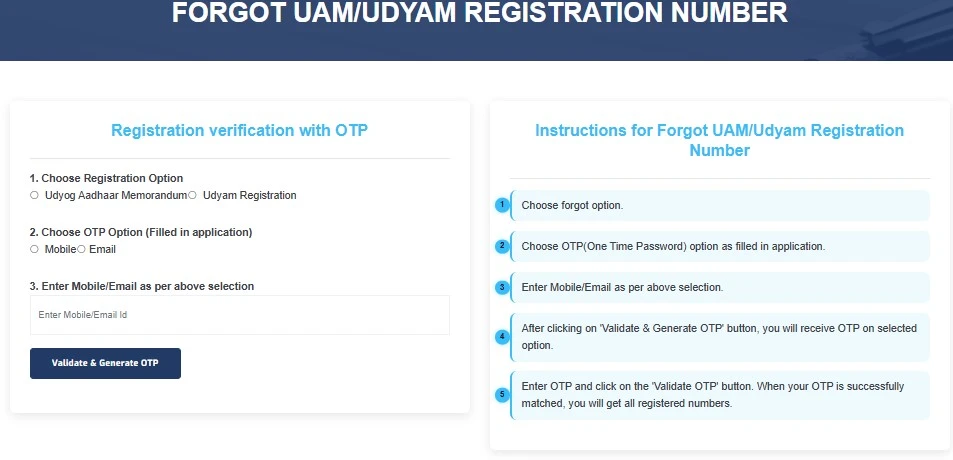
udyam gov forgot screen

Note: The validity of the OTP is only 10 minutes, so enter the OTP quickly.
3
After entering the OTP, click on the “Validate OTP” option. If the OTP matches successfully, your Udyam Registration number will be immediately displayed on your screen.
udyam gov forgot screen

Note: When you get your Udyam Registration Number, note it down carefully, take a photo, and save it in Google Drive.

After receiving the Udyam registration number, you can log in to your MSME account. Follow these steps and quickly log in to your account without any problem. To read more about "how to log in to the Udyam portal briefly", you can read this blog: How to log in Udyam Portal

Steps to log in to the Udyam Portal

1

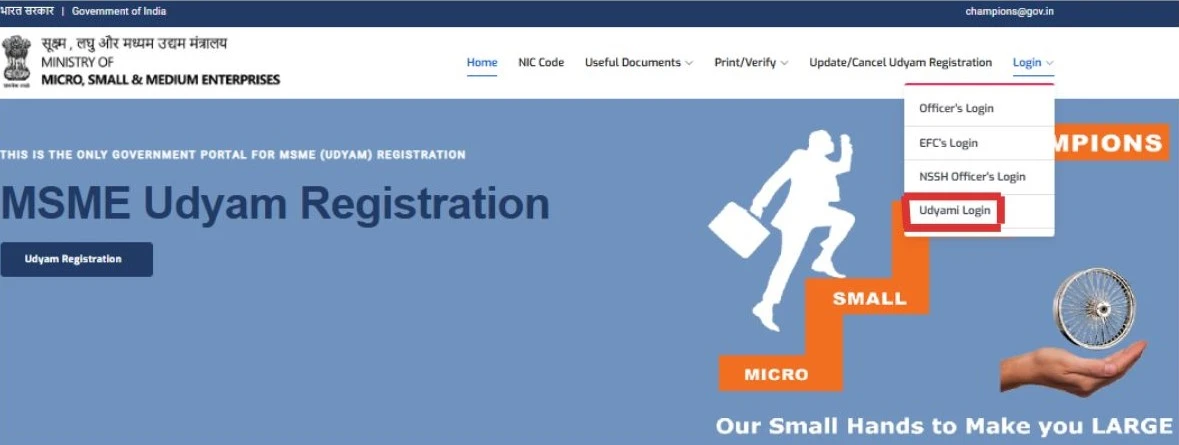
First of all, go to the official Udyam Registration Portal or udyamregistration.gov.in.
2
After opening the home page, click on the “login” option seen on the right-side corner and then choose the “Udyami login ” option from the drop-down box.
udyam gov forgot screen
3
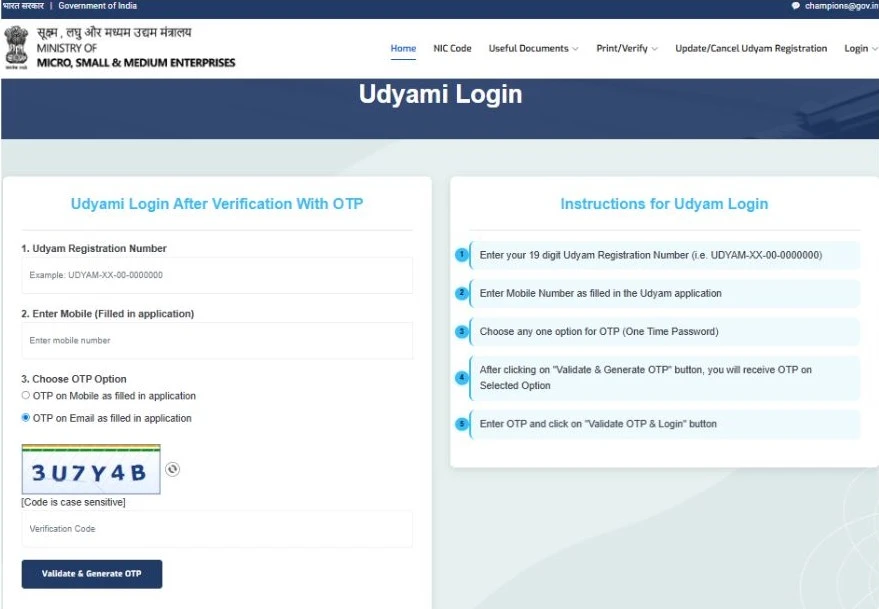
After clicking the “Udyami login” option, open a new page. Enter your Udyam registration number and your registered mobile number. Then choose the OTP option( if you want the OTP on your phone number, then choose the phone number; if you want the OTP on your email ID, then choose the email ID) and fill in the verification code. Click on the “Validate and Generate OTP” option.
udyam gov forgot screen
4
You will receive the OTP on your selected option. Enter the OTP and finally click on “Validate OTP & login”, and wait for a minute; then you will log in.

Conclusion

As we know, through Udyam registration, MSMEs get the benefit of many subsidies and incentives from the government, and loans are also available from the bank at cheap interest rates, so the Udyam registration number is very important for MSMEs. If you forget the registration number, don't worry; you can generate it immediately by using the method mentioned above and avail all the benefits that MSMEs are getting, and also log in to the Udyam login account hassle-free.

Are you planning to apply for Udyam Registration but don’t know where to start? Udyam India is here to help. We provide online consultancy to guide you through the registration process and certificate downloads, editing, URN recovery, form filling, and other MSME-related work.
Frequently Asked Questions(FAQs)


No, without the Udyam number, logging in is impossible. If you have forgotten your number, first recover it. Once you get your Udyam Number, you can use it to log in to the portal.

If you forgot your Udyam number, don't worry. Visit the official Udyam Portal and select “Forgot Udyam/UAM Number.” Enter your registered mobile number and email ID. Complete the OTP verification process after successfully verifying your Udyam number shown on the screen.

Yes. You can download your Udyam Certificate again. If you know your Udyam Number, visit the official Udyam Portal and log in using your Udyam Number and registered mobile number or email ID. Complete the OTP verification and click on “Print Certificate” to download your certificate. If you do not know your Udyam number, you can first try to recover your URN, and then you can download your certificate.

Yes. You can check your Udyam registration details without logging in. Visit the official Udyam Portal, click on “Print/Verify”, and select “Verify Udyam Registration.” Enter your Udyam Registration Number and fill in the captcha, then click “Verify.” Your Udyam details and registration status will be shown.

Don’t worry, first you can recover your Udyam number using your registered mobile number or email ID. Visit the official MSME Portal and select“Forgot Udyam/UAM Number”. Complete the OTP verification to recover your number. After recovering your URN, log in to the Udyam portal and download your certificate again.
Sapna - Author
   

Written by Tanya Bansal

Business & MSME Content Writer

Tanya is a business content writer specialising in Indian business compliance. She creates clear, practical content that helps business owners understand registration processes, government schemes, and related requirements. Her articles are based on reliable sources and are written with a focus on accuracy, clarity and real user needs.

Apply For Udyam Service - Registration, Update, Download, etc..